
Last week I was in the room with the leaders of SMACNA Western Washington. SMACNA is the association for sheet metal and HVAC commercial contractors. Owners. Senior PMs. Operations heads. Contractors who pay for ChatGPT, Claude, or Copilot and aren’t sure they’re getting their money’s worth.
The room was sheet metal and HVAC. The problem is universal. Every construction company I talk to, general contractors, specialty contractors, owners running $50M shops and $500M shops, wrestles with the same question. How do we actually get our team using these tools?
I ran the session live. My partner Dylan Davis joined us over Zoom from Nashville. Dylan runs Gradient Labs and he’s one of the best implementers of AI in business I’ve come across. I bring the construction application expertise. He brings deep AI knowledge. Together we train construction teams to use these tools where it counts.
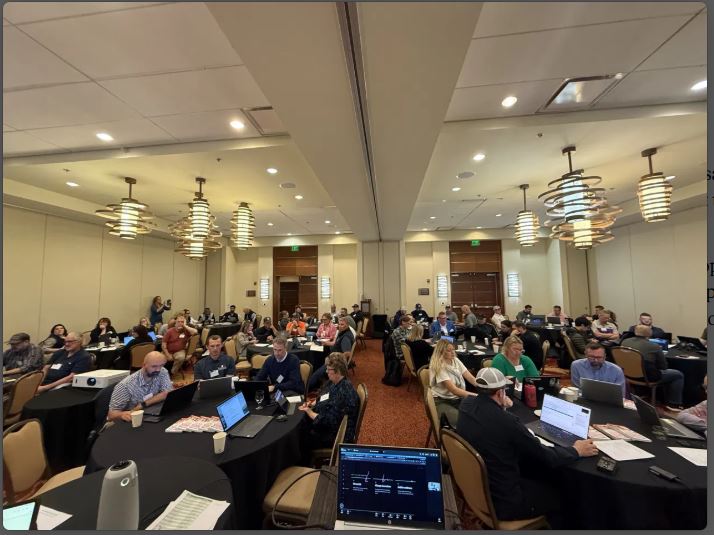
This wasn’t a presentation. It was a workshop. Hands on the keyboards. Real prompts. Real spec documents. Dylan demoed live on screen in both ChatGPT and Claude, switching back and forth so the room could see how the same task plays out in each one. Questions firing across the room the whole time. The goal was simple. Send everyone home with three or four practical ways they could use AI to make their work lives more efficient on Monday morning.
Why Most Contractors Aren’t Getting Anything Back
Here’s what I see in every conversation with construction pros who are frustrated with AI.
They opened ChatGPT once. They typed “write me a submittal cover letter.” They got back something generic. They closed the tab and decided this stuff isn’t ready for our industry.
That’s not AI failing. That’s a vague input producing a vague output.
While you’re waiting for the tools to get smarter, a few of your competitors are quietly saving hours every week. Not on flashy stuff. On the boring stuff. Spec review. Field report cleanup. Pulling scope language out of a 200-page addendum.
Five Moves That Change the Math
We covered ten action items in the workshop. These are the five with the most leverage for a construction company.
You don’t need to transform your company in a week. You need one workflow where the math starts working.
1. Turn off model training in your settings.
In ChatGPT it’s under Settings, then Data Controls. In Claude it’s under Settings, then Privacy. Skip this and your submittals, your change orders, and your client emails become training fuel for the next public model.
This takes 90 seconds. Do it today.
2. Stop typing. Start dictating.
Hit the microphone, not the keyboard. You communicate more context faster when you talk. And you stop editing yourself mid-thought.
This one habit lifts the quality of everything you produce. I watched it happen in the room. Guys who’d been typing one-line prompts switched to dictating a paragraph of context and got back something they could actually use.
3. Use the What-Why-How framework on every real prompt.
What do you want the AI to do. Why do you want it. How do you want it done.
The “why” is what everyone skips. Tell the AI you’re writing this RFI response because the GC keeps coming back with the same question and you want to shut it down once. Now the AI knows what good looks like. Without the why, you get the generic version.
4. Pick one repeated task and build a project for it.
Weekly submittal log. Spec review. RFI drafts. Field report cleanup. ChatGPT calls them Projects. Claude calls them Projects too. Copilot calls them Agents. Gemini calls them Gems. Same idea in every tool.
Drop in the instructions. Add three to five examples of past work you’d be proud to put your name on. Now you have a custom AI that does that one task well. Every time. Stop doing that thing from scratch.
5. When you pull data from a spec or plan, do three things.
Tell the AI to use only the document you gave it. That’s grounding.
Tell it that “I don’t know” beats a wrong answer. That’s changing the incentives. The default AI behavior is to give you an answer because it thinks that’s what makes you happy. You have to tell it that a blank is better than a fabrication.
Then demand page numbers and quoted text for every claim. That’s evidence.
Run those three on anything with money, schedule, or reputation on the line. Non-negotiable.
Where Most People Get Stuck
Three things tripped up the room.
File sizes. The AI has a finite working memory. Every file you upload takes a bite. Drop a 60-tab estimating workbook in and the AI has less room to think about what you’re actually asking. Convert Word docs to text where you can. Don’t drop a 40-slide deck in when the three pages you need will do.
Picking the wrong model. Every provider gives you a small fast model and a bigger slower one. Quick lookups and short emails go to the small one. Spec analysis, scope comparisons, and anything you’re sending to a customer goes to the big one with reasoning turned on. Dylan showed this live by asking ChatGPT and Claude the same complex question on instant mode versus thinking mode. The difference was night and day. Running every task on the same setting wastes you on the easy work and shortchanges you on the hard work.
Confusing Projects, Skills, Connectors, and GPTs. Different jobs, different tools.
Connectors plug the AI into your email, your calendar, your CRM. Projects are custom AIs built for one recurring activity with their own instructions and reference files. Skills are reusable abilities you can call from any chat in Claude. GPTs are shareable AIs meant for distribution outside your company.
Most contractors only need Projects to start. The rest comes later.
How to Keep Up When the Tools Change Every Month
Dylan closed with the only honest answer to “how do I keep up with AI.”
You can’t, in any final sense. The tools change every month. What you can do is build a wishlist.
Write down every task in your business that either eats your time or would change the math if you could hand it off. Estimating support. RFI drafting. Submittal review. Change order narratives. Weekly field reports. Prevailing wage paperwork.
Then test each one against the current tools. Some you’ll solve today. Some will fail because your prompt was weak, and you’ll fix it. Some will fail because the model isn’t there yet. Come back to those next month when the next version drops.
The wishlist is a living document. The point isn’t to finish it. The point is to keep your work in front of the tools, so the moment something new ships, you notice.
What to Do Monday Morning
Pick one task you do every week that you don’t enjoy.
Maybe it’s the weekly submittal log. Maybe it’s cleaning up field reports. Maybe it’s writing the same kind of RFI response for the fourth time this month.
Open ChatGPT or Claude. Turn off training. Hit the microphone. Tell it what you want, why you want it, and how you want it done. Take whatever comes back and fix it.
Then do it again tomorrow with a different task.
Block 20 to 60 minutes a day for this. Real work, not exploration. The contractors who win with AI aren’t the ones who read the most articles about it. They’re the ones who put their hands on the tools every day until the friction disappears.
That’s the work. Get on it.
MONDAY MORNING CHECKLIST
- ☐ Turn off model training (90 seconds)
- ☐ Pick one repeating task you don’t enjoy
- ☐ Use What-Why-How to prompt it
- ☐ Block 20 minutes tomorrow to do it again
Want Your Team Using AI Like This?
Dylan and I run the Construction Genius ChatGPT Course twice a year. It’s built for construction teams, not individual learners. Presidents send their PMs, estimators, ops leads, and admin staff through together. Everyone walks out using the same frameworks, building real projects with real construction documents, and saving hours the following week.
It’s the practical version of what we covered with SMACNA, built out across multiple sessions.
The next cohort is filling up. Get on the waitlist here.